Power Steering Pressure Sensor
The Power Steering Pressure Sensor is used by the Haltech ECU to monitor the pressure, and to perform tasks such as idle up when the pressure increases. The pressure sensor will also highlight any diagnostics in the ESP Software if the pressure exceeds the indicated max or falls below the indicated minimum.
Wiring Tab
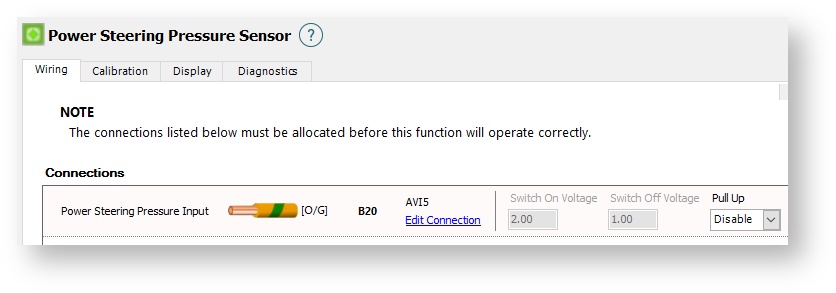
Connections
Power Steering Pressure Input
Select an appropriate input to use for the Power steering pressure sensor. An AVI (Analogue Voltage Input) or an SPI (Synchronised Pulsed Input) should be used.
Connection Type
SPI
An SPI (Synchronised Pulsed Input) requires configuring of the edge and the type of Sensor to be connected.
Edge Select
Falling is used when the input is grounded when the switch is activated. Rising is used when the input is supplied voltage when the switch is activated.
Sensor Type
Set to Hall Effect for all switch inputs
Pullup
Enables a pullup if required to generate a voltage when the switch is off.
AVI
An AVI will require Switch On and Switch Off voltages to be configured so the Elite ECU can know which voltages on the AVI meet the conditions required.
Switch On Voltage
The voltage either above or below where the switch is considered to be ON. When selecting an appropriate value some consideration should be given to allow for voltage fluctuations.
Switch Off Voltage
The voltage either above or below where the switch is considered to be OFF. When selecting an appropriate value some consideration should be given to allow for voltage fluctuations. Eg. if the switch is at 5V when it is Off and is grounded to 0V when the switch is On, you would set the On voltage to 1.0V and the Off Voltage to 4.0V.
The switch is at 5V when it is Off and is grounded to 0V when the switch is On. Correct settings with tolerance would be to set the On voltage to 0.5V and the Off Voltage to 4.5V. i.e. when the voltage falls below 0.5V it is considered to be ON, and when it rises back above 4.5V it is considered to be OFF.
The switch is at 2.5V when it is OFF, and is at 12V when it is ON. Correct settings with tolerance would be to set the On Voltage to 4.5V and the Off Voltage to 3.0V. i.e. when the voltage rises above 4.5V it is considered to be ON, and when it falls back below 3.0V it is considered to be OFF.
Calibration Tab
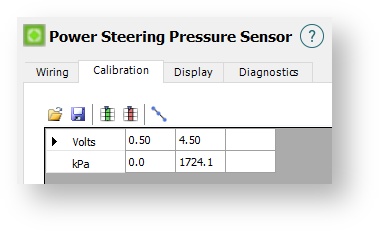
This allows calibrations for a Power Steering Pressure Sensor to be loaded or saved. A number of calibrations come pre-installed with the ESP Software package. If your sensor is not listed, a custom calibration can be created with the data provided by the sensor manufacturer. The default calibration will be for the Haltech 150psi Pressure Sensor.
From the image above:
1 – Selecting the yellow Open icon on the top left will allow the loading of a pre-configured calibration file.
2 – Selecting the blue Disk icon next to the open icon will allow the saving of your custom calibration file.
Display Tab
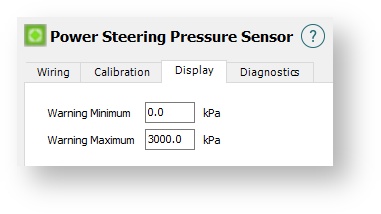
Warning Minimum
When the Power Steering Pressure Sensor reads below this amount, any power steering pressure items on the ESP software will flash Red as a warning of low pressure.
Warning Maximum
When the Power Steering Pressure Sensor reads above this amount, any power steering pressure items on the ESP software will flash Red as a warning of high pressure.
Diagnostics Tab
The settings in this tab allow limits to be set for the detection of either fault conditions, or conditions that could be considered to cause engine damage.
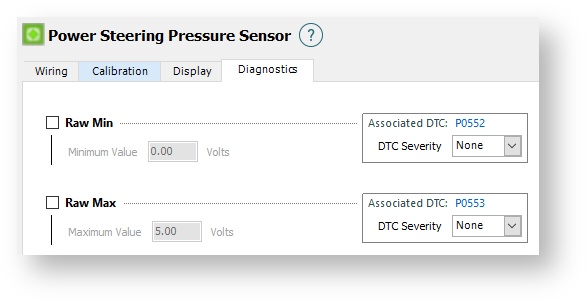
Raw Min
When enabled, this allows for the error code P0552 to be set when the voltage is below the set amount. This is used to detect a short or disconnection with the wiring. If the Engine Protection function is active a DTC Severity level can be selected for this condition if desired. (Default = Disabled)
Raw Max
When enabled, this allows for the error code P0553to be set when the voltage is above the set amount. This is used to detect a short or disconnection with the wiring. If the Engine Protection function is active a DTC Severity level can be selected for this condition if desired. (Default = Disabled)