Vehicle Speed Sensors
Vehicle Speed Sensors (VSS) can be used with your Elite ECU for multiple purposes. Besides datalogging, vehicle speed sensors are used for Fuel and Ignition Tuning, Traction Control, Idle Control, Boost Control, Gear Detection, and many other purposes. Up to 4 Vehicle Speed Sensors can be used with the Elite ECU, and these can be either wired to the Elite ECU or received via CAN with supported vehicles.
|
Page Contents |
Wiring Tab
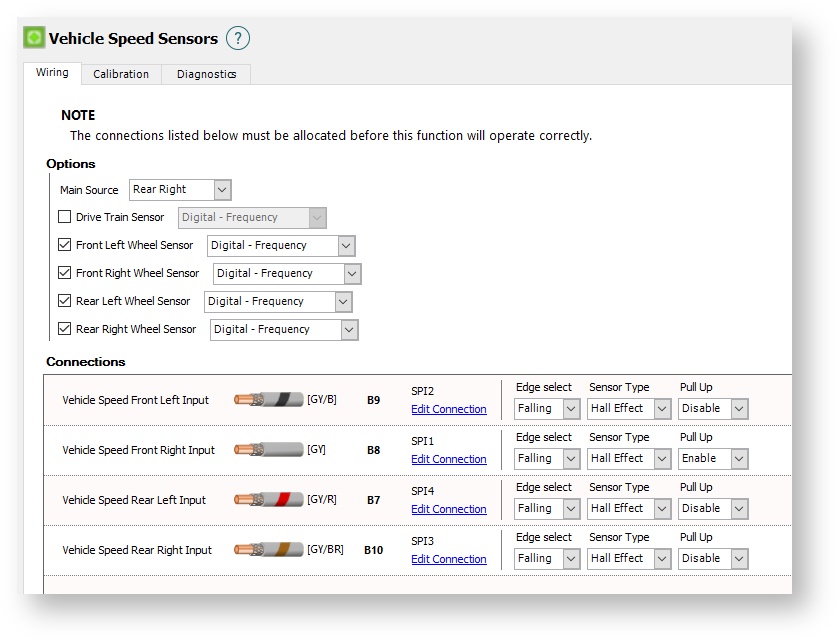
Options
Main Source
Select the sensor that is to be used by the ECU for general use Vehicle Speed. This will be used by various ECU functions that require a vehicle speed.
Drive Train Sensor
Enabled when a VSS is located on the gearbox. Select if the sensor is wired to the Elite ECU or it is input via CAN.
Front Left Wheel
Enabled when a VSS is located on the front left wheel. Select if the sensor is wired to the Elite ECU or it is input via CAN.
Front Right Wheel
Enabled when the VSS is located on the front right wheel. Select if the sensor is wired to the Elite ECU or it is input via CAN.
Rear Left Wheel
Enabled when the VSS is located on the rear left wheel. Select if the sensor is wired to the Elite ECU or it is input via CAN.
Right Rear Wheel
Enabled when the VSS is located on the rear right wheel. Select if the sensor is wired to the Elite ECU or it is input via CAN.
Connections
Vehicle Speed Inputs
When Digital Frequency is used as the type of sensor, select an appropriate input to use for each of the enabled Vehicle Speed Sensors. An SPI (Synchronised Pulsed Input) should be used.
Edge Select
Select the edge of the signal to be used. Typically this will be Falling unless instructed otherwise.
Sensor Type
Select if the sensor being used is a digital Hall Effect or a reluctor sensor.
Pull Up
Some Hall Effect sensors require a Pull Up if it is not incorporated in the wiring or the sensor itself. Enable as required.
Calibration Tab
This allows calibration of all vehicle speed sensors.
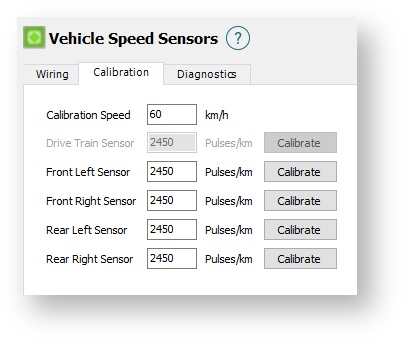
Calibration Speed
The speed that the vehicle must be moving precisely at when each sensor is to be calibrated.
Drive Train Sensor and Wheel Speed Sensors
With the vehicle travelling at exactly the same speed as has been entered for the Calibration Speed, press Calibrate for each of the enabled sensors. The Elite ECU will measure the Pulses/km for each sensor accordingly. This value can be manually entered if it is known.
Diagnostics Tab
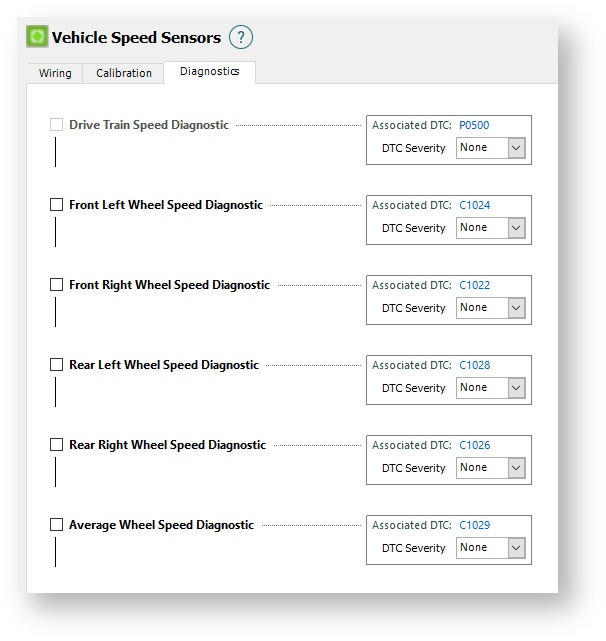
Diagnostic Trouble Codes will be activated under the following conditions:
If 1 or 2 sensors
* Vehicle speed is 0
* TPS is below User Demand Minimum setting and
* MAP is less than -60 kPa and
* RPM is between 2000 and 5000 RPM and
* The above conditions have been true for more than 10 seconds
If more than 2 sensors
* The RPM is less than 4000 and
* TPS is less than 20%
* And the speed is more than 15km/h different from the average of all the vehicle speed sensors
Drive Train Speed Diagnostic
When enabled and activated sets the DTC P0500.
Front Left Wheel Speed Diagnostic
When enabled and activated sets the DTC C1024.
Front Right Wheel Speed Diagnostic
When enabled and activated sets the DTC C1022.
Rear Left Wheel Speed Diagnostic
When enabled and activated sets the DTC C1028.
Rear Right Wheel Speed Diagnostic
When enabled and activated sets the DTC C1026.
Average Wheel Speed Diagnostic
When enabled and activated sets the DTC C1029.